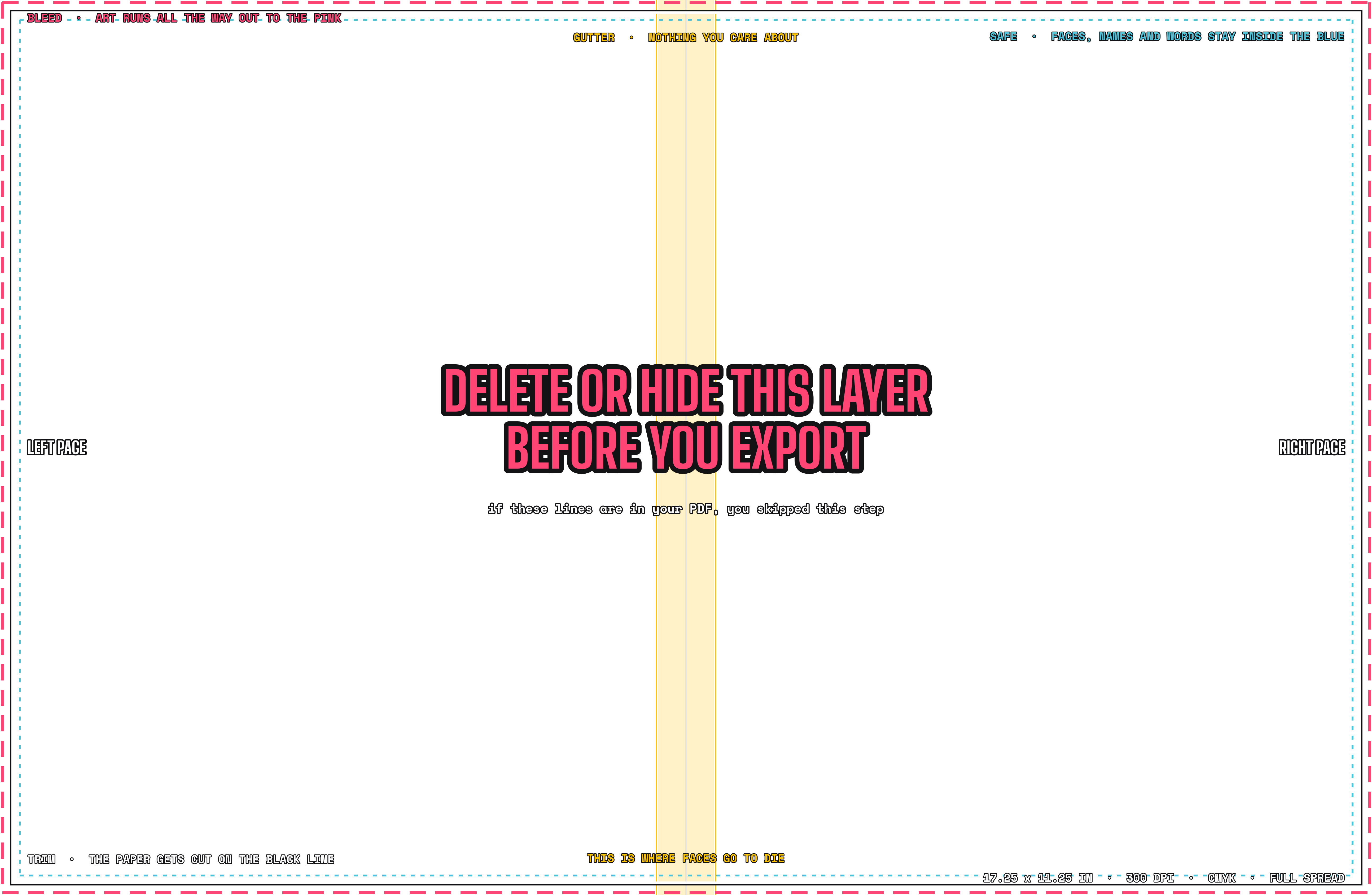
- File > New. Set Width to
17.25 in, Height to11.25 in, Resolution to300, and Color Mode toCMYK, 8 bit. Click Create. - File > Place Embedded. Pick the guides PNG. Press Enter.
- Lock the layer. Click the lock icon in the Layers panel so it can’t move.
00Read this first
What a complete project looks like
Picture the finished file open on your screen. Then compare yours to it.
Two pages sit side by side on one wide canvas, and the canvas is full. Not mostly full. Full to the edges, because the big photo runs off the edge on purpose. That’s called bleed.
It’s the first sign you read the specs.
Left page: the big photo.
You, doing the thing your spread is about, photographed by a classmate on a class camera. Your eyes are sharp. The photo takes up more than half the spread. It’s not a selfie, and it’s not a screenshot from your Instagram.
It’s a real photo someone stood up and took.
Across the top, a headline in real words. Not “About Me.” Five words or fewer, and only you could have written them.
Right page: two or three smaller photos, each with a caption underneath that says who, what, and when. Under the photos is your body copy: 120 to 180 words about one thing you really care about, written the way you’d say it out loud. Somewhere on the spread, in small text, is your name.
Nothing is in the gutter, the strip down the middle where the two pages meet. No faces, no words, no logos. The pink dashed guides are gone from the export. The PDF is named ABOUT_ME_Gianna C_FINAL.pdf, it’s between 2 and 8 MB, and it’s posted in YB-STANDUP. And you stood up and talked about it for 45 seconds without reading off the page.
The test
Compare your spread to that.Whatever is missing is your to-do list.
01The brief
What you’re making
One spread about you, built the same way every spread in the book gets built.
Shoot it, write it, design it, export it, post it, and present it. It will never be printed, and that’s the point. The first time you go through the whole process, the subject should be one you can’t get wrong.
You’re the only person you don’t have to interview.
- Size
17.25 × 11.25 inwith bleed. That’s5175 × 3375 pxat 300 dpi, in CMYK. These are the real book’s specs, not practice specs. Page specs explains why. - ToolPhotoshop, because it’s a photo spread. Canva only if you have to.
- Guides layerPut SPREAD_GUIDES_17.25x11.25.png on top of your canvas while you work, and turn it off before you export. Pink dashed line = bleed, black line = trim, blue dotted line = safe area, yellow band = gutter.
- PhotosOne big photo and two or three small ones. All taken this year, by a classmate, on a class camera.
- WordsA headline (five words or fewer), body copy (120 to 180 words), a caption under every small photo, and your name.
- Turn-inPost the PDF in YB-STANDUP in the first 10 minutes of class. Then present it, standing, for 45 seconds.
02Shoot it
Take thirty photos, keep three
- Find a classmate. You don’t take the photos of yourself.
- Check out a camera in yb-equipment. Use a class camera. Only use a phone if Sensei says so. Never used a camera? Camera School takes twenty minutes.
- Go outside or stand by a window. The light in this room is terrible.
- Take thirty photos. Keep three: one big horizontal photo of you doing your thing, and two small ones.
- Zoom in on your eyes on the camera screen. If they’re blurry, shoot again. Do it now, not tomorrow.
03Write it
Write the way you talk
- Headline: five words or fewer. If it still says “About Me,” it isn’t done.
- Body: 120 to 180 words about one thing. Write it using “I.” Read it out loud, and cut anything you’d never actually say.
- Captions: one sentence each. Who, what, and when. Write them in the present tense.
- Give it to the person next to you. If they ask “What’s this about?”, rewrite your first sentence.
04Design it
The layout
Photoshop
Canva
- Create a design > Custom size.
17.25 × 11.25 in. Use inches, not px or cm. - Uploads > Upload files. Pick the guides PNG, drag it onto the page, and stretch it to the corners.
- Lock it. Select it, then click the lock icon in the top bar.
The rules
- Big photoMore than half the spread, and running off at least one edge, past the pink line, on purpose.
- GutterNothing in the yellow band. No faces, no words, no logos. Anything there disappears into the fold.
- Safe lineKeep everything important inside the blue dotted line: words, faces, and your name.
- FontsTwo font families at most. One for the headline, one for everything else.
- Your nameIt has to be on the spread. Small is fine. Missing isn’t.
- Cover the big photo with your hand. If the spread still looks fine, the photo isn’t big enough.
05Export + turn in
The hand-in
No guides in the export. PDF only. Posted in YB-STANDUP.
Pink dashes in a turned-in file means you skipped step 1. It happens to somebody every year. Don’t be the somebody.
A file sitting on your desktop doesn’t count.
- Click the eye icon on the guides layer to turn it off.
- Photoshop: File > Save a Copy > Format:
Photoshop PDF> Save > presetHigh Quality Print> Save PDF. Canva: Share > Download > File type:PDF Print> Download. - Name it
ABOUT_ME_FirstName L_FINAL.pdf: your first name and your last initial. - Check your work: open the PDF. If you see pink dashes anywhere, you exported the guides. Go back to step 1. The file should be 2 to 8 MB.
- Post it in YB-STANDUP in the first 10 minutes of class, with one line about what you want people to look at. “Not sure about the headline” is better than posting with no message.
A file sitting on your desktop doesn’t count.
06Stand up
The 45 seconds
Your spread goes up on the TV. You stand up.
- What your spread is about. One sentence.
- The one choice you’re proud of.
- The one thing you’d fix.
- Don’t read the page out loud. We can read it. Sit down at 45 seconds.
- Practice it out loud once, with a timer, before class. Everyone goes too long the first time.
07The checklist
The rubric
Thirteen lines. Each one is a yes or a no. Tap a line to check it off. It stays checked on this device.
- ☐The canvas is
17.25 × 11.25 inat 300 dpi, including bleed - ☐Big photo: you, taken by a classmate on a class camera, eyes sharp, more than half the spread
- ☐The big photo runs off at least one edge
- ☐Two or more small photos, each with a caption: who, what, and when
- ☐A headline, five words or fewer, that isn’t “About Me”
- ☐Body copy: 120 to 180 words, using “I,” about one thing
- ☐Your name is on the spread
- ☐Nothing in the gutter band, and nothing important outside the safe line
- ☐Two font families at most
- ☐No guides in the export (no pink dashes)
- ☐PDF, 2 to 8 MB, named
ABOUT_ME_FirstName L_FINAL.pdf - ☐Posted in YB-STANDUP in the first 10 minutes
- ☐Presented for 45 seconds, standing, without reading
0/1313 out of 13 means it’s done.
Anything less isn’t done yet. Fix it and post it again in the same thread.
Anything less isn’t done yet. Fix it and post it again in the same thread.
08Late?
You still owe it
Nothing gets skipped
It was due Friday, September 11. Missing the deadline didn’t make it go away. It made it the first thing on your list.
Post it in YB-STANDUP the day you finish. Same rules, same checklist. You’ll present your 45 seconds the next Wednesday, during the Show us what you got time. Tell Sensei it’s posted, in person.In person. Not a DM.